
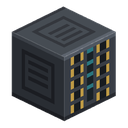
Monitor Core
alaindustrial:monitor_core
Summary
The Monitoring Wall is a warehouse dashboard: a row of panels by your base entrance showing how much of each item is in your chests, without opening any of them. It is three blocks and one item:
- Monitor Core — the brain: it takes power from a cable, holds a rack of 10 cards, and hands the panels their numbers. Without a core the wall does nothing. The body is a dark block with amber eyes, framed edges and the card rack on its front: the core glows while it has power and goes dark without it, and every filled slot lights up cyan.
- Smart Wire — a line that reads containers instead of carrying goods: run it from the core to chests, barrels, shulkers and the mod's own chests.
- Monitor Panel — the screen. The body is a slim wall terminal: dark with no filter item, lit while one. Panels placed against each other and against the core join into one system, in any shape: a wall can turn a corner or wrap a pillar.
- Capacity Card — fitted into the core, each card lets the wall track 6 different item types (up to 60 with a full rack of 10 cards).
Mini-example: fit a capacity card into the core, run a smart wire from the core to your ore chest, place a panel next to the core and right-click a diamond into it → the panel shows how many diamonds are in the wired chests.
How it works
- One item type per panel. To watch more types, build more panels.
- Once a second the core walks the wired containers once for the whole wall and hands out the numbers, so a big wall costs the server no more than a small one — it costs more only in energy.
- Only top-level slots are counted; the system does not dig into shulkers inside chests — the same rule the Stock Display Frame keeps.
- A double chest counts as one container.
- A container whose loot has not been generated yet is not read at all: looking inside would unpack its loot table with no player in context and empty somebody else's chest for good.
Energy and capacity
- Reinforced amethyst is what the system is built from. Four amethyst shards and a pinch of silver dust go into the Alloy Smelter; both the core and the capacity card are made of the result. The wall costs a running machine, not only materials.
- With no capacity card the wall shows nothing. A bare rack means zero tracked types, and every filled panel burns the yellow
x. A card is the price of the system, not an upgrade on top of a working one. - Upkeep: a base cost at the core plus a surcharge for every panel actually showing a number. An empty panel costs nothing.
- Card capacity limits the number of types, not of panels: two panels watching the same item take one slot of capacity.
- When capacity runs out, the same panels always go dark (the order is geometric and does not change across world reloads), never random ones.
What a panel shows
| Mark | Meaning |
|---|---|
| A number | all is well: that much of the item sits in the wired chests |
grey ? | this part of the wall has no core — the wall was broken apart |
red ! | the core cannot pay for the wall |
amber x | not enough card capacity |
Number format: exact up to 10,000, then 12.3k and 1.2M. The text is legible from 24 blocks.
Above the number sits the item's icon, as in the inventory: blocks as a small 3D cube, flat items flat. A 3D model lies whole in front of the screen and never pokes out of the block face, and a model wider than an inventory slot is shrunk so it does not spill onto the neighbouring panel.
Interface
Only the core has a screen. Right-click the core to open it:
- a rack of 10 slots for capacity cards — drag cards in and out, one per slot; a full rack refuses openly ("The rack is full") instead of swallowing the item;
- four numbers — capacity (how many types are allowed and how many are actually tracked), filled slots, stored energy, and upkeep with the number of panels it powers;
- a lamp with one line — "Wall is running", "Fit a capacity card" or "Not enough power".
The quick gesture still works: Shift + right-click the core with a card in hand seats it in a free slot without opening the screen. Hoppers and pipes follow the same rule — only cards go into the core, one per slot.
- right-click a panel holding an item → the item becomes the filter;
- right-click a panel empty-handed → the filter comes back.
Block properties
| Block | Shape and collision | Strength | Tool |
|---|---|---|---|
| Monitor Core | full cube (a framed body with the card rack on its front), glows while powered | 3.0 / 6.0 | pickaxe |
| Monitor Panel | slim wall terminal: 4 pixels deep, not a whole cube | 2.0 / 4.0 | pickaxe |
| Smart Wire | slim 4×4×4 core plus an arm toward each connection | 0.2 / 0.5 | pickaxe |
The core and the panel face the player when placed. Power enters the core through any face but the front — a cable never draws an arm across the screen the player is meant to read. Panels and the wire take no energy at all.
Recipes
| What | Where | Made from |
|---|---|---|
| Reinforced Amethyst | Alloy Smelter, 1200 EU/FE | 4 amethyst shards + silver dust |
| Monitor Core | crafting table | 4 reinforced amethyst, 2 electrum plates, 2 advanced circuits, an energy crystal in the middle |
| Capacity Card | crafting table | reinforced amethyst in the middle, 4 silver plates, 3 redstone, an advanced circuit |
| Monitor Panel | crafting table | a Stock Display Frame in the middle, 4 glass, 4 silver plates, an electronic circuit |
| Smart Wire ×4 | crafting table | gold ingot, copper cable, redstone (in a column) |
What this is not: Applied Energistics
The system only ever looks. Items stay physically in the player's chests: they cannot be withdrawn remotely, cannot be inserted through the network, take no part in crafting and are never stored as a digital copy. A capacity card is the right to watch a few more types, never a place to keep one.
Limits of the current version
- Exactly one core per system: a second core in the same connected wall stops it entirely.
- The card has a single tier; a tier ladder and a second axis (wire reach) are open questions in.
- Balance (upkeep, capacity, scan interval) is configurable and will be tuned from play.
Crafting
Shaped Crafting


▶
Monitor Core