
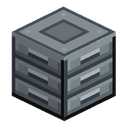
Storage Module
alaindustrial:storage_module
Summary
The Storage Module is a 27-slot block whose whole point is that it merges with its neighbours. Put two modules against each other and you have one 54-slot warehouse behind a single window. Three makes 81. Four makes 108, and that is the ceiling.
Right-click any module and the window shows the whole warehouse, not just the 27 slots of the block you clicked.
No energy, no redstone, any shape you like — a wall, a column, an L. The one rule: modules must touch face to face, not along an edge or a corner.
Quick example: you placed a module, filled it, ran out. Butt a second one against it: open either of the two and you are looking at 54 slots as one list.
Energy
| Field | Value |
|---|---|
| Role | none |
| Buffer (EU/FE) | 0 |
| Max input (EU/FE/tick) | n/a |
| Max output (EU/FE/tick) | n/a |
| EU/FE/tick | 0 |
The module takes no part in the energy network: it neither carries EU/FE nor connects to cables.
Inventory
| Slot | Accepts | Count |
|---|---|---|
| Module storage | any items | 27 (3 rows of 9) |
Items physically sit in the module they were put into. There is no master inventory: the warehouse window is a view over every module's inventory at once, not a separate store. Everything else follows from that — what drops when you break one, and what happens when a chunk unloads.
How the warehouse adds up
| Modules adjacent | Warehouse slots | Rows total | Rows shown | Scroll |
|---|---|---|---|---|
| 1 | 27 | 3 | 3 | none |
| 2 | 54 | 6 | 6 | none (bar drawn inactive) |
| 3 | 81 | 9 | 6 | 3 rows |
| 4 | 108 | 12 | 6 | 6 rows |
| 5 or more | 108 (cap) | 12 | 6 | 6 rows |
Slots and rows are unchanged — only the window is: it shows at most six rows and the rest are reached with the scrollbar on the right. Why six is in the Balance section.
Merging rules
- A module joins the warehouse if it touches another member face to face. Edge and corner contact does not count — so you can build two separate warehouses flush against each other.
- The set is worked out afresh every time the window opens, walking out from the module you clicked. Nothing is remembered, so placing or breaking a module needs no rebuilding.
- If a build holds more than four modules, the first four in walk order form the warehouse. Clicking a different module of the same build may give a different four — the window shows how many are connected, so this is visible.
Interface
- Two window sizes: 3 rows (176x166) for a lone module and 6 rows (195x220) for anything larger.
- A scrollbar sits to the right of the grid, in the 19 px added to the panel width for it. The mouse wheel, dragging the thumb and clicking the track all work.
- A two-module warehouse has nothing to scroll to, and the bar is drawn in its inactive shade rather than disappearing: a control that comes and goes is harder to read than one visibly off.
- Shift-click fills the rows that are off screen too. Not a detail: vanilla's shift-click moves between menu slots, and the window only has six rows of them, so the obvious implementation would quietly stop halfway and report the warehouse full while half of it was empty.
- No search — 108 slots is too few to need one.
What is synced. Two numbers in ContainerData: how many rows the warehouse has in total, and which row the window sits on. The client needs the first to draw the bar and the second to place the thumb; the server owns both. The scroll itself travels on vanilla's, where the button id IS the requested top row; the server clamps it, so a packet asking for row 500 cannot read past the warehouse.
Why a view rather than moving the slots. Slot.x/Slot.y are public final, and a menu's slot list is part of the network contract: the indices in ClientboundContainerSetSlot are positions in it, so rebuilding the list under a live menu desynchronises the client. Vanilla's one scrolling display (the creative inventory) does the same thing: the slots never move, what moves is the answer the container behind them gives.
Block Properties
| Field | Value |
|---|---|
| Shape | full cube 16³ |
| Hardness | 3.0 |
| Blast resistance | 6.0 |
| Tool | pickaxe |
| Drops with NBT | false — contents are not kept in the item |
Looks: a warehouse reads as one cabinet
The module is a steel cabinet with three drawers — one per row of nine slots it adds to the window. Top and bottom are not drawers but a body plate with an inset service panel.
Adjacent modules merge visually as well. Along the face two modules share, the frame disappears: the drawer fronts run on across the joint, the tops become one continuous bench top, and the border survives only around the outside of the warehouse. A 2x2 wall reads as one six-drawer cabinet, a row of four as one long one.
The merged look means exactly one thing: this is one warehouse. The moment a build grows past four modules the frames come back on all of them at once, and the build looks like separate cabinets again. That is not cosmetic but an honest signal: in a build that size the warehouse depends on which module you click (see "Merging rules"), and no seam could promise that two blocks are one store. Take the extra module away and the merged look returns.
Touching at an edge or a corner merges neither the mechanics nor the picture: two warehouses can stand flush against each other and still look separate.
How it is drawn. The connection is built into the block model, not laid over it. Every face is cut into non-overlapping rectangles — one band per edge, four one-pixel corners on the cap faces and the middle — and each rectangle is drawn exactly once, from either the framed texture or the open one. Nothing is offset outward and nothing overlaps, so a joint cannot pick up its own lighting or show a step. The first version instead laid patches over the cube, pushed 0.1 blocks proud, and the player saw a raised band running through the bench top and a short black line where a patch ended.
A rim corner on the cap face belongs to two edges at once, so it opens only when both of its neighbours are there. Handing it to one edge punches a two-pixel hole in the east/west border at every north-south joint.
The blockstate and its 21 models are generated (python tools/gen_storage_module_models.py) and are only edited through the generator. --check (wired into and the pre-commit hook) compares the files against the generator and separately proves the joint is seamless: every pixel of every face is drawn exactly once, no element leaves the block volume, and the wall and bench top composed from the models are pixel-identical to a reference "one big cabinet" built from the framed texture alone.
Breaking a module drops its own contents and nothing else. Neighbouring modules are untouched: their items are theirs and never moved.
Breaking a module in the middle of a build simply splits it — each part becomes its own warehouse. Items in the detached modules do not drop: they stay put and rejoin the shared window once the connection is restored.
Breaking the assembler next to a warehouse gives the player back only what the machine itself held — the blueprint queue and the output area — and leaves the modules alone (TC-ASM-026 counts the drops exactly, so both a loss and a double drop show up). Taking the warehouse apart walks the capacity down to zero and never past it (TC-STOR-010; a count that went negative is what crashed Functional Storage).
Pipes are pinned by transport, not by the presence of a port. TC-STOR-012 runs sixteen ingots chest -> pipe -> warehouse and back, and separately checks that a dry run moves nothing and promises exactly what the committed move then carries — a mismatch between those two numbers is the classic duplication bug (XNet #173).
Contents survive a reload. TC-STOR-013 takes a module through NBT — the same path a chunk save and load takes — and checks among other things that slots do not shift: an empty slot left deliberately between two occupied ones has to come back empty.
Recipes
- Craft — 4 iron plates in a cross around a vanilla chest.
The recipe is cheap on purpose: growing the warehouse is a consumable, not a milestone.
Progression
- Tier: none — no energy required, available as soon as you have plates.
- Where it sits in the storage line: Iron Chest 36 → Silver 45 → Gold 54 → Electrum 81 → a module warehouse 108. The chests keep their value: they give their whole capacity in one block, the warehouse needs four.
- Later: the Assembler will draw its materials straight from a warehouse like this.
Related
- Gold Chest — the previous storage step
- Material Forms — the plates for the recipe
- Stock Display Frame — the reference for unloaded-chunk safety
- Assembler — the future consumer of the warehouse
- Item Pipe — fills the warehouse from outside
Crafting
Shaped Crafting


▶
Storage Module
Used in
Shaped Crafting


▶
Assembler