Drone Nest
alaindustrial:drone_nest
Summary
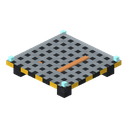
The Drone Nest is a grated pad on legs for a construction drone with an electromagnet. The nest on its own is empty: the drone is a separate item that you put into the nest. The nest can be placed anywhere over the town hall, within its footprint; the yellow carpets of the drone pad are only a hint. The drone takes one building from the settlement's queue of orders — the town hall or a house — and restores it: clearing first, then a road to the settlement's network (for a house), then building — one flight, one block.
Quick example: the settlement has a lit LV core, and the Town Dispatcher holds the town hall's plan and the materials. Place a nest on the town hall's roof and put a construction drone in it (right-click with the drone). Press "Start" in the dispatcher — the drone takes off, first clears the town hall (takes away cobwebs, broken bricks, grass and flowers), then builds: it carries blocks from the dispatcher's buffer and lays them in place.
How it works
- Its own settlement and town hall. The nest finds the settlement whose territory it stands on, and works only if it stands over this settlement's town hall: over its footprint (seen from above), from the town hall's floor up to 8 blocks above its roof. Otherwise it says "Not over the town hall". No carpet is needed for this. The drone flies all over the settlement: to the town hall, to the houses and to the site of a new house.
- The drone. An empty nest shows a bare grate, does not charge and does not count towards the nest limit. Right-clicking with a construction drone puts it in; right-clicking with an empty hand while sneaking takes the drone out as an item, and the charge stays on the item. A drone in flight cannot be taken out. A broken nest drops its drone with its charge.
- How many nests work. The core's tier sets the number of working nests: LV — 1, MV — 2, HV — 3, atomic — 4. A restored town hall completes the pad on the roof: +1 more nest. Extra nests stand idle and say "Extra nest: the core's tier allows no more". The ones that started working first are the ones that work. Only nests with a drone over the town hall are counted.
- One building — one drone. A free drone takes the first order in the dispatcher's queue that no other drone has taken, and holds its work — clearing, road or building — until it is finished. No other drone will take that building. Building a house starts only once its clearing and its road are finished.
- Flight. The drone never flies through blocks: before take-off it plots a route through the air — over the roof, along the walls, through the door — and lands on the cell from above, or beside it if the top is closed. It flies smoothly: it speeds up, banks into turns and brakes before landing. On arrival it checks the cell again — the world may have changed during the flight. It flies back the same way and recharges in the nest.
- Doors, trapdoors and gates. Doors and trapdoors that open by hand, and any gates on its way, the drone opens the way a player does (with the sound) — a block and a half before the opening — and closes them behind it if it opened them. If a player closed a door while the drone is inside, the drone opens it from the inside on the way back. An opening left open stays open. Iron doors and iron trapdoors it leaves alone: it flies around them, or the cell waits for a route.
- A temporary passage. If there is no route to a cell (the ruin's walls have walled it in), the drone does not stop but makes itself a passage: it finds which blocks — no more than two — can be taken away for a while, removes them one per flight, places the cell's block and puts every removed block back in place, the last one first. It removes only blocks of the building itself standing as they should, dirt, stone, rubble and plants; never a block with data, an unbreakable block, a liquid, a waterlogged block, a two-cell block, a block above the lab's hatch, a block with sand or gravel on it or a block next to a liquid. No items from the buffer are spent on this. If something goes wrong (the job changed, the nest stopped working), all removed blocks go back at once; if the spot is taken, the block goes into the buffer or drops on the ground: the drone leaves no holes. It also places blocks so as not to wall itself in: a block that would close the last way into a neighbouring cell of the same stage waits until that cell is placed. If there is no route even so, the job stands with the reason "The drone cannot reach x y z" and tries again by itself after 5 seconds.
- No plan — no work. The drone builds the town hall only from the restoration plan in the dispatcher, and a house only if the settlement has learned the plan of its type. If you take the town hall's plan out of the dispatcher or break the dispatcher itself, the drones stop: a drone in the air flies on to its cell, does nothing there, takes nothing from the buffer and returns to the nest, and the job stands with the reason "No restoration plan". Put the plan back and the work carries on by itself. A repair of a building restored earlier needs no plan.
- Clearing. From the top down, so that sand above the rubble comes away before what it lies on; sand or gravel above a removed block falls, as it does for a player. Only litter is removed: blocks from the debris list, whatever the ruin itself put where the intact building has a different block, whatever is replaced on placing, plants and other litter (grass, flowers, saplings, bushes, mushrooms, sugar cane, cacti, vines, cobwebs, lily pads, snow layers, soot) and liquid where the intact building has air. A tall plant goes as a whole. What is removed disappears. Once the building is cleared, the drone clears a three-block ring around the town hall and around a house from the level above the floor and higher: sand, sandstone, dirt, stone, gravel, snow, flowers, cacti, chains, slabs, the ruin's rubble and other debris. The walls stand free. Blocks with data and other buildings in the ring are left alone; the core pays for every block removed, just as for clearing.
- The site of a new house. On the site of a house the restorer laid themselves, the drone also removes nature — dirt, stone, sand, logs, leaves, grass — and puts everything removed into the dispatcher's buffer (whatever does not fit drops on the ground).
- The road. For a house not connected to the settlement's network, before building the drone lays a Town Road to the nearest point of the network: it takes the road blocks from the buffer, cuts the extra earth on the course into the buffer, fills the pits with earth fill from the buffer and removes the grass and flowers above the road.
- The foundation. Before a house's first block the drone fills the pit under its floor with earth or stone from the buffer (Dirt, Coarse Dirt, Cobblestone, Cobbled Deepslate, Stone, Sandstone) — from the bottom up, only open cells with ground under them — so the house stands on the ground both after a ruin is restored and on a new site.
- Building. From the bottom up, layer by layer, until the building looks intact. A block is taken from the dispatcher's buffer at the moment the drone places it. The drone does not place sand and gravel on air — it waits until the block under them is placed. A two-cell block goes up whole in one go, as it does for a player: a door, a bed, a Charging Bed, a tall plant; one item is taken from the buffer, as for a player. The drone places the town hall's storage chests empty. The drone does not place the core, the capsule, the dispatcher or nests.
- A block with data on a plan's spot. A chest, a machine or another block with data, and any block that is not litter, standing where the plan has a different block, the drone leaves alone and does not skip silently: the job stands with the reason "In the way: X at x y z", and the restorer gets one chat line. Take the block away and the building carries on by itself.
- A creature in the cell. If a player or a mob stands in the cell, the drone skips that cell and comes back to it later.
- Unloaded chunk. A cell in a chunk that nobody keeps loaded — the job stands with the reason "Chunk not loaded". Chunks are not loaded for the sake of construction.
- House plaques. When there is nothing to do in the queue, the drone looks after the houses' plaques: it flies over and changes the plates so the plaque shows its resident's number — a whole letter and three digits (resident E-102 — "E102"). A house left empty — the first letter becomes broken: the number of the last resident stays. A house where nobody has lived yet keeps the ruin's plaque. This is quiet work: no chat messages and no order in the queue; the core pays for each plate as for a block. A plate the player carried off is first brought back by the house's repair, then the drone engraves it. The letters are "Engraved Letter Plate" plates.
- Saving mid-flight. The drone is not a creature but a state of the nest: on leaving the world it is neither lost nor duplicated, and the item for a block stays in the buffer until the block is placed. The nest also remembers the blocks removed for a passage.
Drone energy
- The nest charges the battery of the drone inside it only from the Settlement Core — from what the core holds beyond its reserve for upkeep. Neither a cable nor charging blocks charge the drone. An empty nest takes nothing.
- The core pays for every block placed, removed, taken away for a while and put back, and for every plate of a plaque.
- The flight is paid for by the battery: for every block of the route there and back. Before take-off the battery must hold enough for the whole flight plus one block.
- The core goes dark — the drone finishes the flight it has started on its battery (the battery pays for the block) and returns to the nest; there are no new flights, and the job stands with the reason "No energy" until the core is lit again.
- The battery is empty and the core cannot charge it — the drone stays in the nest, and the job stands with the reason "No energy".
Status
Right-clicking the nest writes above the hotbar what is going on with it: "No drone. Put a construction drone in", "No town around", "Not over the town hall", "Extra nest: the core's tier allows no more", "No dispatcher in the town", "No restoration plan in the dispatcher: drones stand", "The settlement core is off", "No energy", "Waiting for work", "Working", "Waiting: see the core's Construction tab", "No way through the air to the cells left: tried again later" — and the drone's charge in percent along with whether the core is charging it right now ("the core charges it" or "the core does not charge it"). A job that has stopped is shown with its reason on the dispatcher's "Orders" tab and on the building's card in the core; the nest tries again by itself every 5 seconds. The drone first takes what is waiting in the queue, and then any stopped work of the settlement, not only the one it stopped itself: put the materials into the dispatcher and construction carries on by itself.
Energy
| Field | Value |
|---|---|
| Role | takes nothing from the grid; the battery is charged by the Settlement Core |
| Drone battery | 4000 EU/FE |
| Charge from the core | up to 16 EU/FE per tick while the drone is in the nest |
| Block price (paid by the core) | 20 EU/FE per block placed, removed, taken away for a while or put back, and per plaque plate; for a two-cell block — for each half |
| Flight price (paid by the battery) | 1 EU/FE per block of the route, there and back |
| Speed | 2 ticks per block of the route |
Block Properties
| Field | Value |
|---|---|
| Shape | a 16×16 grated plate on four legs, 3 px high, copper contact strips and four turquoise lights up to 3.8 px; a docked drone — up to 12 px. Collision and click — the 3 px plate (the drone does not get in the way of walking). Not a full cube |
| Placement | anywhere over the town hall's footprint, from its floor up to 8 blocks above the roof; the yellow carpets of the pad (8 in the plains town hall, 6 in the desert one) are a hint where it is convenient |
| Hardness and tool | pickaxe, hardness 2, blast resistance 6. In a settlement with a restorer only the restorer can break it |
| Drops | the nest; a drone inside drops as a separate item with its charge |
Sound
While the drone is in the air you hear a quiet looping sound of propellers — the same as the garden drone's — and it comes from the drone itself, not from the nest. In the nest the drone is silent.
Construction Drone
A separate item, stack size 1. It goes into an empty nest. The drone's charge is kept on the item (a bar under the icon and a "Charge: N%" line in the tooltip); the tooltip reminds you that the drone goes into a nest over the town hall and charges from the settlement core. Charging blocks and the energy pack do not charge it.
Recipes
Nest (crafting table): an Electronic Circuit, a Copper Cable (the contacts), two Copper Plates and four Iron Plates.
| Row | Slots |
|---|---|
| 1 | Copper Plate · Electronic Circuit · Copper Plate |
| 2 | Iron Plate · Copper Cable · Iron Plate |
| 3 | Iron Plate · — · Iron Plate |
Construction Drone (crafting table): a Battery, two Electronic Circuits, a Copper Coil and four Copper Plates.
| Row | Slots |
|---|---|
| 1 | Copper Plate · — · Copper Plate |
| 2 | Electronic Circuit · Battery · Electronic Circuit |
| 3 | Copper Plate · Copper Coil · Copper Plate |
Progression
- Needs a lit Settlement Core and a Town Dispatcher with a plan and materials.
- Restores the town hall, then the shift workers' houses; lays the Town Road.
- Next: drones of later tiers (faster, carrying more than one block, other classes of buildings) and modules — as separate tasks.
Related
- Town Dispatcher — the plan, the queue of orders and the material buffer.
- Settlement Core — the building cards, the charge and paying for blocks.
- Engraved Plates — the drone puts together the number on a house's plaque from them.
- Garden Drone Station — a relative in how its flight works.
Crafting
Shaped Crafting

▶
Drone Nest